

If you’ve come across the term “managed print services” — or had a provider pitch it to you — you might be wondering what it actually means, and what it would change about how your business prints. It can sound like jargon for “someone else looks after the printers,” which is partly true but misses the point.
Here’s a clear definition: managed print services (MPS) is an outsourced model where a single provider takes responsibility for your entire print environment — the devices, the supplies, the maintenance, the monitoring, and the costs — and manages it as one streamlined service instead of a scatter of separate purchases and problems. Rather than treating printers as isolated bits of hardware your team props up when they break, MPS treats printing as a managed business function with predictable costs and defined service levels. This guide explains exactly how it works, step by step, and what’s included.
Why businesses bother with MPS in the first place
Before the how, it helps to understand the why — because the problem MPS solves is one most businesses don’t realise they have.
Printing is a surprisingly large and invisible cost. Studies have long estimated that uncontrolled print costs consume around 1 to 3% of a company’s total revenue, and that roughly 90% of companies don’t track their printing costs at all — yet those that do can typically cut print spending by 10 to 30%. The reason it stays hidden is that the cost is spread across dozens of small things: retail toner cartridges bought as they run out, staff time lost to paper jams and error codes, emergency call-outs, and a mismatched fleet of devices nobody planned. MPS exists to pull all of that into one managed, visible, predictable service.
How managed print services works: the process step by step
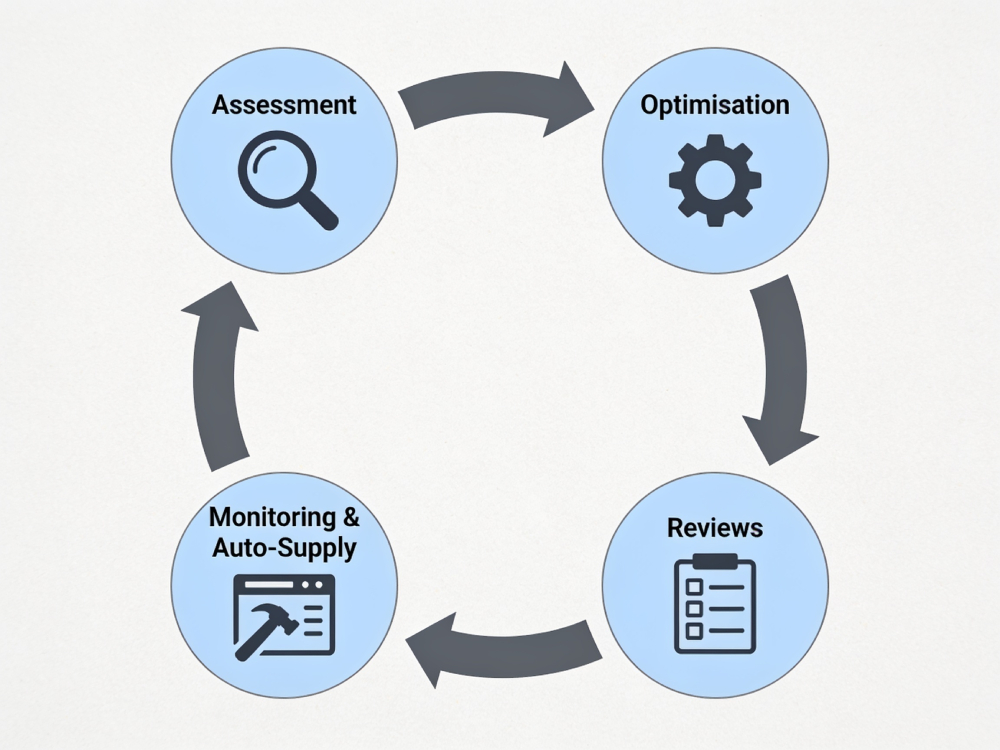
A proper MPS engagement follows a clear lifecycle. Understanding these stages is the best way to see what you’re actually signing up for.
Step 1: The print assessment. Every credible MPS program starts here. The provider audits your current print environment — every device, how much each one is used, your page volumes, your workflows, and what it’s all really costing you. This usually runs over a short period so the data reflects real usage, not a guess. The assessment is the baseline for everything that follows; a provider can’t fix what they haven’t measured.
Step 2: Optimisation and right-sizing. With the data in hand, the provider designs a better setup. This often means consolidating devices (most offices run more printers than they need), putting the right device in the right place, and recommending where to keep existing equipment versus replace it. A good provider right-sizes your fleet rather than forcing a wholesale “rip and replace” — devices that are working well stay put.
Step 3: Implementation. The agreed setup is rolled out — any new or reconfigured hardware is installed and integrated into your network and workflows, designed to cause minimal disruption to your day-to-day. Print management and monitoring software is deployed across the fleet.
Step 4: Ongoing monitoring and automated supplies. This is where the “managed” part really lives. Monitoring software tracks your devices in real time — flagging issues before they cause downtime, and detecting when toner is running low so supplies are automatically ordered and delivered before you run out. Your team never has to chase a cartridge or log a supply order again.
Step 5: Reporting and regular reviews. You get reporting on usage, costs and device performance, and periodic business reviews where the provider checks the setup still fits your needs, flags further savings, and adjusts as your business grows or changes. MPS is meant to keep optimising, not be set-and-forget.
What’s actually included in managed print services?
The exact inclusions vary by provider, but a typical MPS agreement bundles together.
- The hardware — printers and multifunction devices, often supplied on a lease so there’s no large upfront purchase.
- All consumables — toner and supplies, delivered automatically as needed (paper is usually the main thing not included).
- Maintenance and repairs — proactive servicing, parts and labour, often with on-site support.
- Monitoring and management software — the system that tracks usage and automates supplies.
- Technical support — a single point of contact for any print issue, instead of your IT person fielding printer complaints.
- Reporting and reviews — visibility into what you print and spend, and ongoing optimisation.
In short, you replace a pile of separate invoices and headaches with one service and one predictable bill. For how that bill is structured and what it typically costs, our guide to managed print services costs breaks down the pricing models in detail.
Two benefits SMBs often overlook
Beyond cost savings, two advantages tend to surprise businesses new to MPS:
It takes the burden off your IT and admin staff. Most IT people don’t want to spend their day fixing printers and ordering toner — it’s low-value work that pulls them off more important tasks. MPS hands that off entirely, freeing your team to focus on what actually moves the business.
It improves print security. Networked printers are an increasingly common entry point for cyber attacks, and most businesses never think about it. A good MPS program includes security measures like access controls and secure print release, closing a gap many SMBs don’t know they have.
Who is managed print services for?
MPS suits almost any business that prints regularly and has more than a couple of devices — from small offices to multi-site operations. If your team loses time to printer problems, you’re buying toner reactively, or you simply have no clear picture of what printing costs you, MPS is designed for exactly that situation. Businesses with a single printer may not need a full program, but as soon as you’re running a small fleet, the savings and the time back usually justify it.
The one variable that matters most is which provider you choose, because “managed print services” is a broad term and the value you get depends heavily on the company delivering it. Things worth looking for: a genuine assessment process (not just “how many printers do you have?”), manufacturer-agnostic advice rather than a push toward one brand, strong reporting, proactive rather than reactive support, and local support you can actually reach.
How QPC Group does it
At QPC Group, managed print is our core business, and we run it the way we’d want it run for us: a proper assessment first, then a right-sized solution built around what your business actually needs. We’re a multi-brand authorised dealer, so our device recommendations are based on fit rather than pushing a single manufacturer. Supplies are reordered automatically through our cloud print management so you never run out, and — importantly — our support is local and Australian-based, not offshore, so when you need help you’re talking to someone who can actually sort it out.
Frequently asked questions
What is managed print services?
Managed print services (MPS) is an outsourced model where a single provider takes over responsibility for your entire print environment — your printers and multifunction devices, supplies, maintenance, monitoring and costs — and manages it as one streamlined service. Instead of treating printers as separate purchases your team supports ad hoc, MPS manages printing as a single business function with predictable costs, automated supplies, and defined service levels, usually bundled into one monthly bill.
How does managed print services work?
It follows a clear process: the provider first assesses your current devices, usage and costs; then optimises and right-sizes your fleet (often consolidating devices); implements the agreed setup with monitoring software; continuously monitors the fleet and automatically reorders supplies before you run out; and conducts regular reviews to keep the setup aligned with your needs. The result is less downtime, predictable costs, and far less print-related hassle for your team.
What’s included in managed print services?
A typical MPS agreement includes the hardware (often leased), all toner and consumables delivered automatically, maintenance and repairs with parts and labour, monitoring and management software, technical support through a single point of contact, and reporting with regular business reviews. Paper is usually the main item not included. The benefit is replacing many separate invoices and tasks with one predictable service.
Is managed print services only for big companies?
No. While large, multi-site organisations benefit greatly, MPS suits almost any business that prints regularly and runs more than a couple of devices — including small and medium businesses. If your team loses time to printer issues, buys toner reactively, or has no clear view of print costs, MPS is designed for that. Only businesses with a single printer may not need a full program.
How is managed print services different from just buying a printer?
Buying a printer is a one-off transaction; MPS is an ongoing managed service. With a purchase, you’re responsible for supplies, maintenance, troubleshooting and tracking costs yourself, usually across a mismatched fleet. With MPS, a provider handles all of that proactively — monitoring devices, auto-supplying toner, fixing issues, and optimising your setup over time — for one predictable cost. It turns printing from a recurring hassle into a managed function.
Does managed print services save money?
For most businesses, yes. Because uncontrolled print costs typically run at 1–3% of revenue and most companies don’t track them, MPS usually surfaces meaningful savings — often 10–30% — through device consolidation, automated supplies that cut waste, and less downtime. The savings come not just from lower per-page costs but from removing the hidden time and admin costs of managing print yourself.
See what MPS could do for your business
Managed print services, done well, turns printing from a recurring source of cost and frustration into something that quietly runs itself in the background. The first step is simply understanding your current setup — and that’s exactly what a print assessment provides.
QPC Group offers a free print assessment: we review your current devices, volumes and costs, then show you a tailored, right-sized solution with transparent pricing and local Australian support. Get in touch with QPC Group or call our team on (08) 9303 3888 to see how MPS would work for your business.
This article provides general information about managed print services. Specific inclusions, pricing and service levels vary by provider — speak to an MPS provider about a solution tailored to your business.